

According to Lauren Davis, successful preparation for the December 2025 SAT hinges on a strict "Tech Audit." Students must update Macs to macOS 12+ (ideally 15.6) and Windows devices to Windows 11 (excluding S Mode). Crucially, you must complete the Bluebook exam setup 5 days before test day to generate your admission ticket and verify device compatibility.
The "Last Chance" Reality Check
If you are reading this, you are likely days away from the December SAT. For Seniors, this is it—your final data point for Regular Decision applications. For Juniors, this is your chance to lock in a score before the heavy lifting of AP exams starts in the spring.
However, in 2025, the biggest threat to your score isn't just the Geometry questions in Module 2—it's your hardware. Internal data from recent test cycles shows that a significant percentage of test-day stress comes from uncharged batteries and outdated software.
Here is your fail-safe checklist to ensure the only thing you have to worry about is the test itself.
Phase 1: The Hardware Audit (Do This Now)
Do not wait until Friday night to check your device. The College Board’s Bluebook app has strict OS requirements for late 2025.
Download & Update Bluebook
Ensure you have the latest version of the Bluebook application. If you already have it, open it now to check for auto-updates. Do not upgrade your operating system the night before the test if you are currently in the "Safe Zone" listed below.
Device Compatibility Table
| Device Type | Operating System Requirements | Storage Space | Peripherals Policy |
|---|---|---|---|
| Mac Laptop | macOS 12.0+ (Rec: macOS 15.6). | 1 GB+ | No external keyboards. External mouse OK. |
| iPad | iPadOS 16.0 or 18.6 (Avoid 17-17.0.3). | 250 MB+ | External keyboard & mouse allowed. |
| Windows | Windows 11 (No S Mode or SE). | 1 GB+ | No external keyboards for laptops. Mouse OK. |
Pro-Tip: Your device battery must last at least 3 hours. While some test centers have outlets, never rely on them. Bring a portable charger if your battery health is questionable.
Phase 2: The "5-Day Before" Rule
You cannot simply show up on Saturday morning and open your laptop. You must complete the Exam Setup inside Bluebook roughly 5 days prior to the test.
The Setup Workflow:
Step 1: Log in to Bluebook and click Complete Exam Setup.
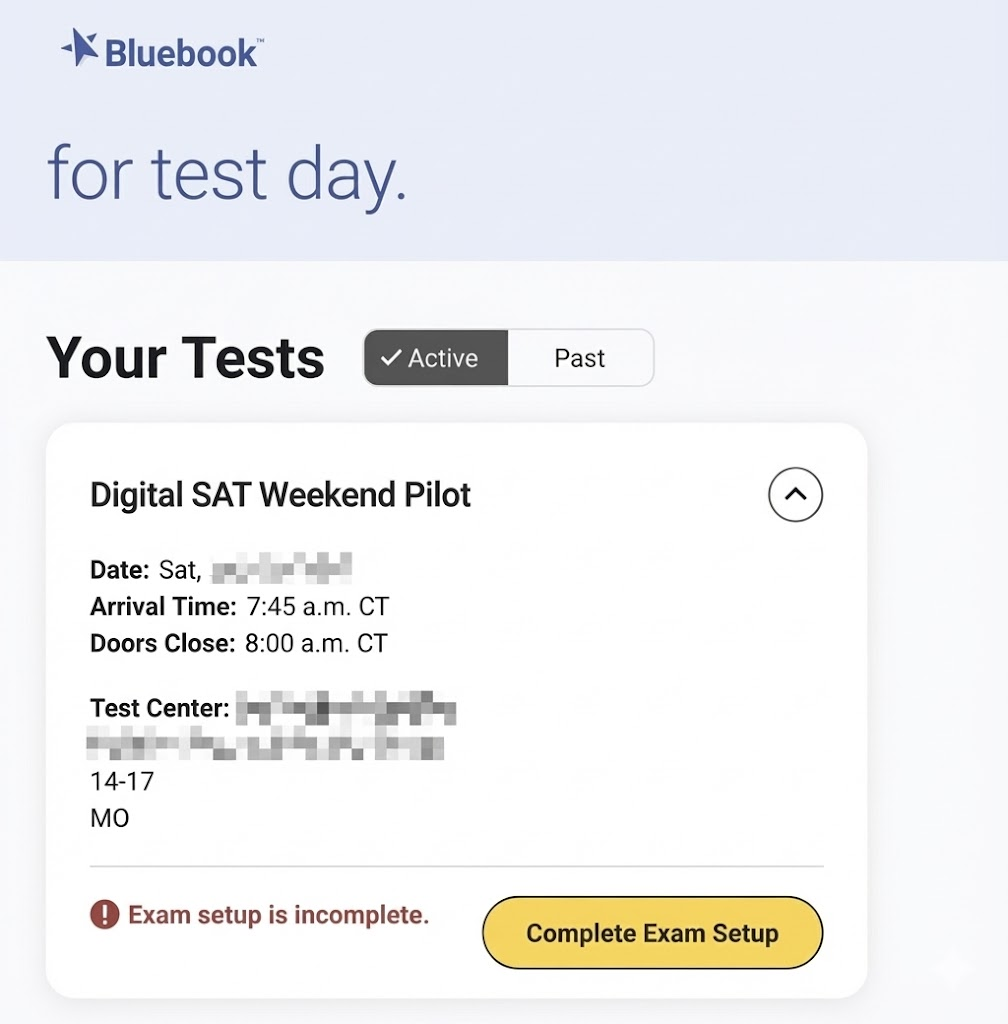
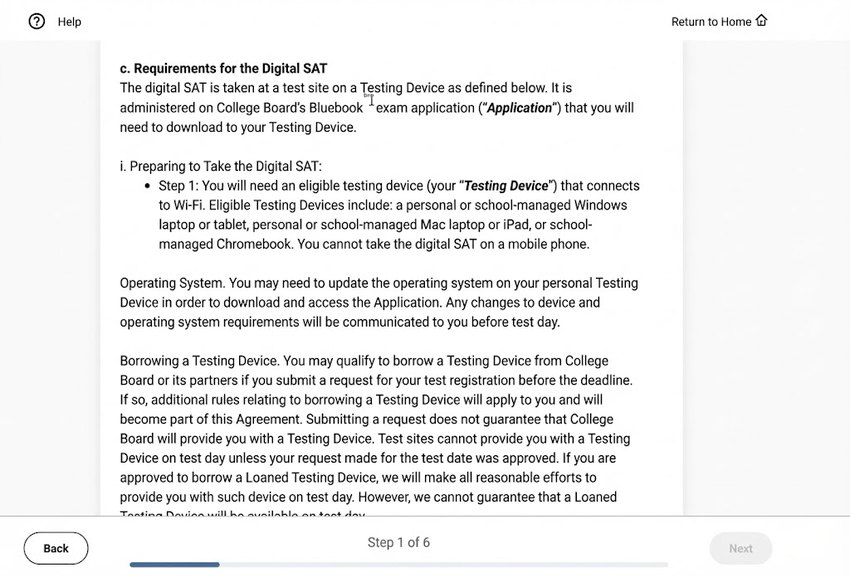
Step 2: Read the exam terms and conditions, check the box to agree, and click Next to proceed.
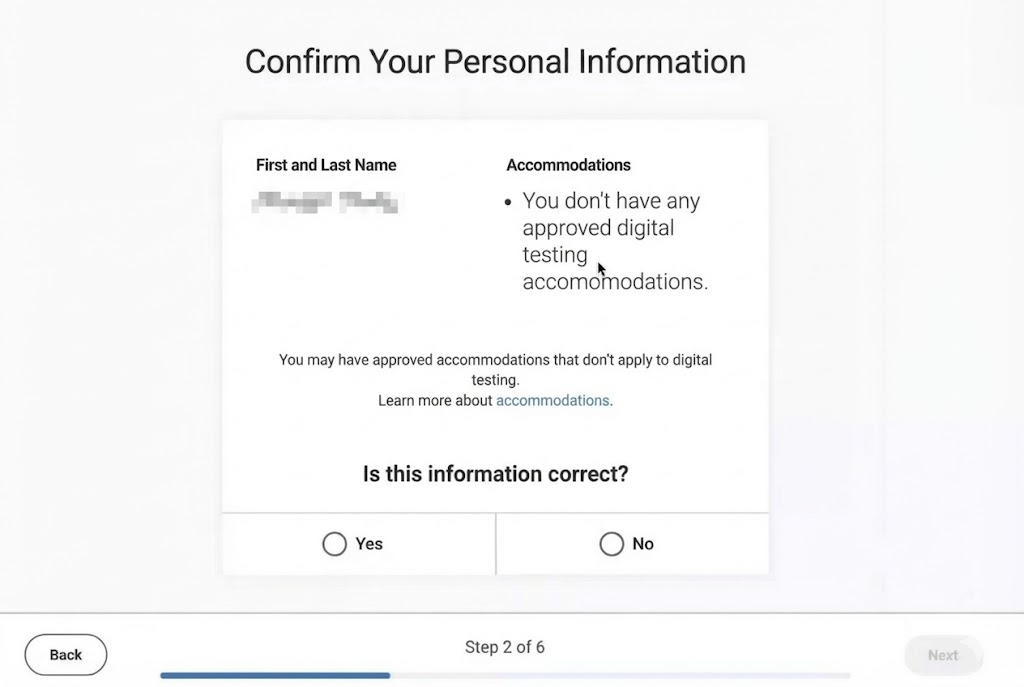
Step 3: Confirm your personal information. If the information is correct, click Yes; if it is incorrect, click No. Click Next to proceed.
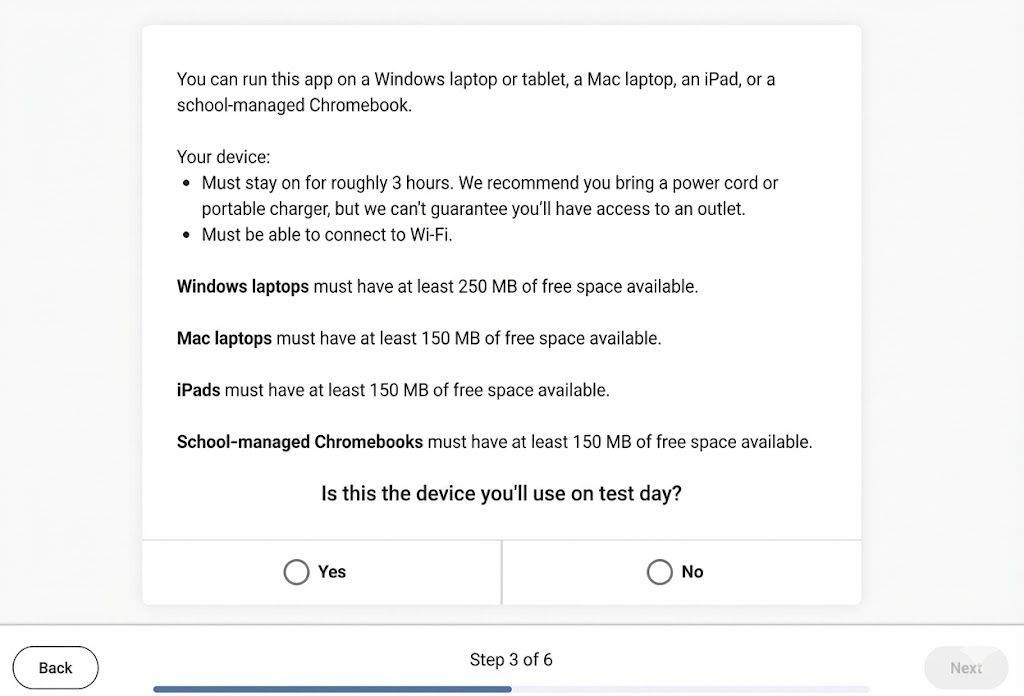
Step 4: Review the device requirements and confirm that the device you are currently testing is the exact device you will bring on test day.
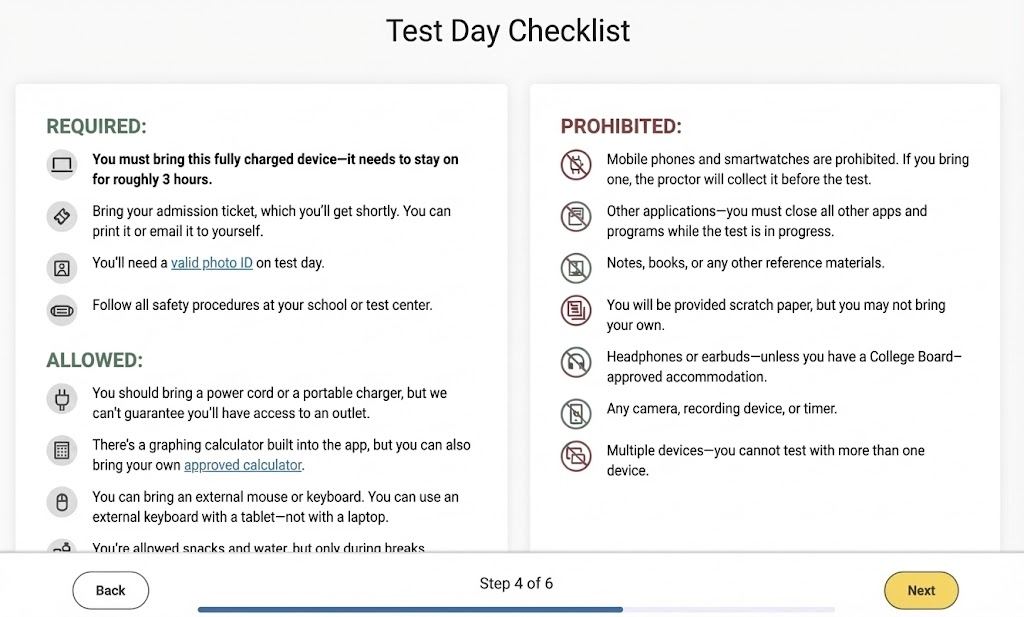
Step 5: Read the list of items you must bring and items that are prohibited on test day, then click Next.
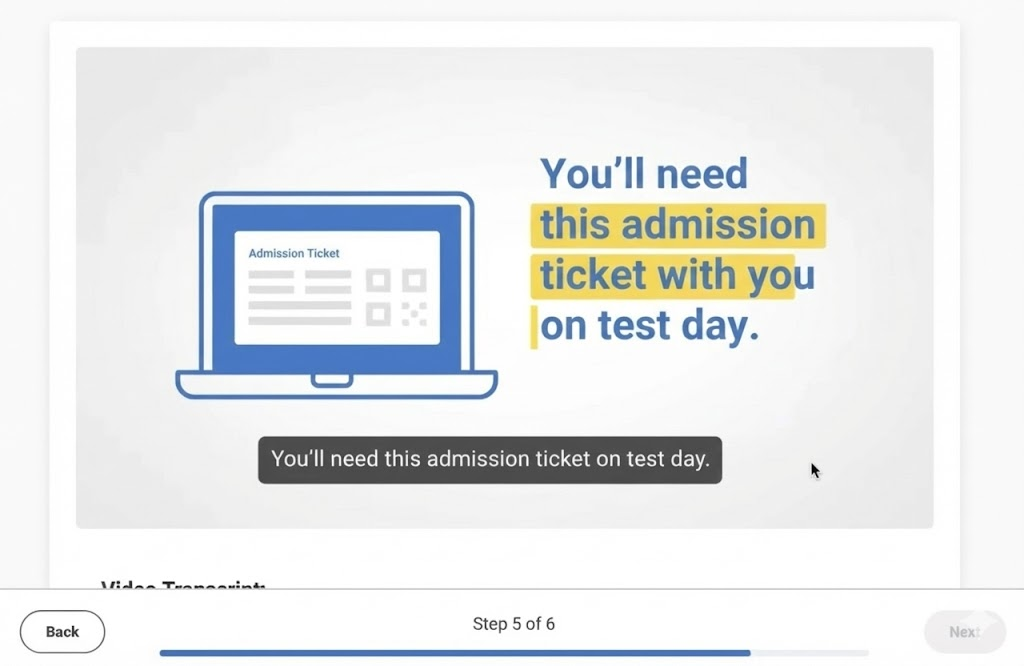
Step 6: Watch the exam introduction video. Once finished, click Next.
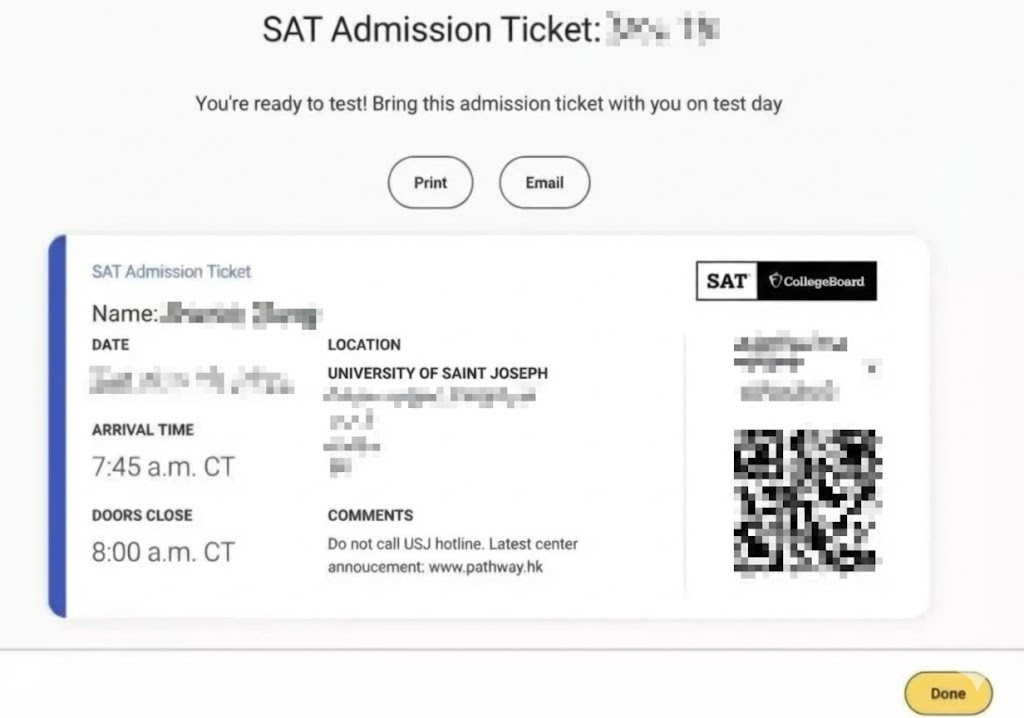
Step 7: Get your Admission Ticket. Click Print to print it immediately, or click Email to send it to your inbox. Once completed, click Done.
Phase 3: The Packing List (Go Bag Essentials)
Pack your bag on Friday night. On Saturday morning, your brain should be in "math mode," not "where are my keys" mode.
The "Must-Haves" (Non-Negotiable)
- ✅ Your Fully Charged Device: (The one you used for setup).
- ✅ Admission Ticket: Printed or accessible (but printed is safer).
- ✅ Valid Photo ID: School ID, Driver’s License, or Passport.
- ✅ Power Cord/Portable Charger: Even if you charged it overnight.
- ✅ Pencils/Pens: For scratch paper work.
The "High-Value" Additions
- Physical Calculator: Yes, Bluebook has Desmos built-in. However, bringing an approved handheld calculator (TI-84, etc.) is highly recommended for speed and as a backup.
- Backup Device: If you have a spare iPad or laptop, bring it. It’s the ultimate insurance policy.
- Snacks & Water: You only eat during the break. Think high-glucose, low-mess (e.g., chocolate or a protein bar).
- Analog Watch: Smartwatches are banned. A simple watch helps you pace yourself if you don't want to constantly look at the screen timer.
Phase 4: Test Day Flow & Strategy
The Timeline:
- 7:30 AM: Arrive. Lines can be long.
- 7:45 AM: Check-in begins. Have your ID and Ticket in hand.
- 8:00 AM: Seating. You will connect to the Test Center Wi-Fi and open Bluebook.
- The Start Code: The proctor will read a code. Enter it to begin the timer.
What if the Wi-Fi crashes?
Don't panic. The Digital SAT is designed to cache data. If the internet drops during a module, keep working. Your work saves locally. If you have a major crash, raise your hand immediately—proctors can troubleshoot most errors.
Cancellation Policy (The "Nuclear Option")
If you feel the test went disastrously wrong (e.g., you fell ill):
- On-Site: Ask the proctor for a "Cancel Scores" form before leaving.
- Post-Test: You have until 11:59 PM ET on the Thursday following the test to cancel via your College Board account or by faxing the formal request.
There are 2 specific ways to proceed:
- At the Test Center: After the test ends, locate a staff member to explain the situation and ask for the "Cancel Scores" form. Fill it out and simply hand it back to the staff member.
- After Leaving the Test Center: Download the form from the official website, fill it out, and submit it according to the instructions.
Form Download URL: https://collegereadiness.collegeboard.org/pdf/sat-cancel-scores-request-form.pdf
Official Website Info: https://collegereadiness.collegeboard.org/sat/scores/canceling-scores
Phase 5: Last-Minute Study Adjustments
With less than a week to go, stop taking full-length practice tests. You will only burn yourself out.
- Review, Don't Reload: Focus on re-solving questions you got wrong in previous practice sessions.
- Vocab Refresh: Review your "unknown words" list. The module 2 reading/writing section often hinges on nuanced vocabulary.
- Rest: Sleep impacts your processing speed more than one extra hour of cramming.
About the author
Lauren Davis - SAT Math Tutor & Prep Blogger
Lauren Davis is a SAT math tutor specializing in algebra, functions, word problems, and time-saving test strategies. Through daily student coaching and real test feedback, she helps students build accuracy, speed, and confidence in high-impact math topics.


